Sales prospecting automation exists to solve a structural problem: pipeline targets keep growing while the manual work required to fill them scales with headcount. According to HubSpot’s 2025 State of Sales Report, 84% of sales reps say AI already saves time and streamlines their prospecting process. The gap between teams running manual workflows and those running automated ones is widening.
The question is how to use AI for sales prospecting automation to drive qualified meetings, ensure deliverability, and give leadership a clear picture of ROI. That means combining AI, CRM data, and automated workflows into a system that scales without sacrificing pipeline quality.
This guide covers how sales prospecting automation works, which tools drive results, how to build sequences that generate meetings rather than bounce rates, and how to measure performance before the next pipeline review
Table of Contents
What is sales prospecting automation?
Sales prospecting automation uses software platforms, AI-powered workflows, and integrated CRM tools to handle the research, outreach, lead scoring, and follow-up tasks that sales teams traditionally manage manually.
These sales automation tools identify target accounts, enrich contact data, trigger personalized email sequences, and log activity directly into CRM systems like HubSpot without requiring rep intervention at each step.
A single platform can run across multiple channels simultaneously — email, LinkedIn, and phone — while maintaining the personalization signals that determine whether outreach converts to booked meetings.
Why Sales Prospecting Automation Matters Now
Buyers are doing more research before they ever speak to a rep — and according to HubSpot’s 2025 State of Sales Report, core sales metrics are holding up despite it.
- 91% of sales teams report stable or improving win rates
- 93% say deal sizes are steady or growing
- 68% say lead quality has improved year over year
These gains hold even as 75% of sales pros cite recession as a top concern and 74% flag inflation.
Automation gives teams the capacity to run high-volume, personalized outreach without adding headcount at a time when budgets are tighter, and buyers arrive at sales conversations already self-educated and harder to impress.
Improves Personalization at Scale
Buyers today research vendors, compare pricing, and read case studies long before a sales rep reaches out, and generic outreach signals immediately that a seller hasn’t done the same homework.
Research shows that 74% of sales professionals say AI tools have made it easier for buyers to research products independently, which means outreach that ignores a buyer’s context is easy to dismiss. At the same time, 83% of reps say AI improves personalization in their outreach, and 29% of prospects cite a lack of personalization as a reason deals fall through.
Automation enables sales teams to send outreach that reflects each prospect’s industry, role, and buying signals without having to rebuild every message from scratch.
Boosts Deal Quality and Pipeline Focus
High deal volume without qualification discipline creates a pipeline that looks healthy on paper but underperforms at close.
Research shows that 37% of deals fail due to a lack of product fit — a problem that surfaces late and wastes significant rep time. Automated enrichment, ICP scoring, and lead triage address this earlier in the process, filtering out low-fit accounts before they consume discovery calls, proposal cycles, and forecast slots.
The practical outcome is a smaller pipeline of better-matched opportunities. Reps spend time on accounts with a realistic path to close, rather than chasing volume that stalls at the qualification stage.
Creates a Consistent, Multi-channel Prospecting Engine
Outreach in 2026 rarely succeeds on a single channel. According to HubSpot research, 42% of sales professionals say social media delivers the highest cold outreach response rate, and 35% say it generates their highest-quality leads.
Automation supports multi-channel execution by sequencing touchpoints across email, LinkedIn, and phone, optimizing send timing, and logging activity across all channels in one place. For larger teams where multiple reps may touch the same account, that coordination layer also prevents duplicate outreach. Prospects get a coherent experience rather than three different messages from three different people in the same week.
Key Features of Automated Sales Prospecting Software
The best sales prospecting tools for GTM automation vary in what they can do and how well they integrate with existing sales workflows. Evaluating platforms against these criteria gives sales leaders a clearer basis for selection before vendor demos and pricing conversations begin.
Contact Data Enrichment and ICP Filtering
Raw contact lists pulled from LinkedIn or a purchased database rarely arrive prospect-ready. Enrichment tools automatically append firmographic data — company size, industry, revenue range, technology stack — to each record, then score leads against a defined ideal customer profile.
Automated filtering typically handles:
- Removing contacts outside the target firmographic criteria.
- Flagging accounts already in active pipeline or marked as closed-lost.
- Prioritizing high-intent signals like technology adoption or recent funding rounds.
Predictive lead scoring prioritizes prospects based on engagement and fit, so reps work from a prospecting list ordered by likelihood of converting, not just by availability.
Multi-channel Sequence Automation
Sales sequences automate multi-step outreach across email, LinkedIn, and phone within a single workflow. Each touchpoint triggers automatically based on prospect behavior or rep-defined rules. The right sales automation tools determine how much of that coordination happens without rep involvement.
A typical automated sequence might follow this pattern.
- Day 1: Personalized email referencing a prospect’s recent company news.
- Day 3: LinkedIn connection request or profile view.
- Day 5: Follow-up email with a relevant case study.
- Day 8: Phone call task auto-created for the rep.
- Day 12: Final email with a direct meeting link.
Without automation, maintaining that sequence manually across a full pipeline is unsustainable at scale.
CRM Integration and Activity Logging
Every prospecting tool in a sales stack generates data such as emails sent, calls logged, replies received, and meetings booked. Without native CRM integration, that data lives on separate platforms, creating a fragmented record that makes pipeline reviews unreliable and forecast calls harder to trust.
Two-way CRM sync ensures that activity logged in a prospecting tool flows directly into HubSpot without manual data entry. A smart CRM centralizes prospect data and reporting — contact records update automatically, deal stages reflect real activity, and when a rep picks up a conversation mid-sequence, the full history is already in the CRM. Automatically tracking and reporting on sales leads this way removes the manual logging that typically creates gaps in pipeline visibility.
Performance Analytics and Sequence Reporting
Prospecting automation generates a significant volume of outreach, and without visibility into what’s performing, sales teams end up optimizing based on assumptions. Sales leadership needs a clear read on where sequences are working and where they’re breaking down.
Key metrics that prospecting analytics platforms surface:
- Open and reply rates by sequence, step, and rep.
- Meeting conversion rate from first touch to booked call.
- Channel performance comparing email, LinkedIn, and phone response rates.
- Drop-off points identifying which sequence step loses the most prospects.
Sales teams use performance data to test messaging, adjust timing, and cut steps that consistently underperform.
Best Tools to Automate Sales Prospecting
Selecting the best sales prospecting tools for GTM automation depends on where the biggest bottleneck sits — data quality, outreach execution, CRM sync, or all three.
HubSpot Breeze Prospecting Agent
Breeze Prospecting Agent is HubSpot’s AI-powered prospecting tool built directly into the HubSpot CRM.
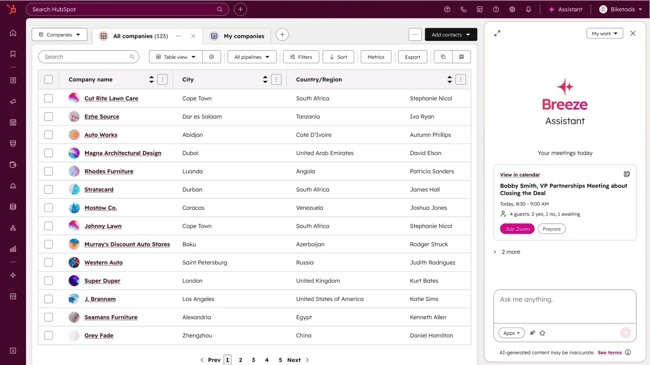
Breeze monitors enrolled companies for buying signals, automatically researches accounts, and drafts personalized outreach when the timing is right, without rep intervention at each step.
The core difference between Breeze and standalone prospecting tools is context. Because Breeze runs inside HubSpot, it draws on the full customer history already in the CRM — past deals, support interactions, marketing engagement, form submissions — to personalize outreach.
A rep enrolls a company, sets research and messaging preferences, and then Breeze handles signal detection, account research, and email drafting. HubSpot reports up to a 95% reduction in time reps spend researching accounts and personalizing emails, and up to 2x higher response rates compared to traditional sequences. For teams already running HubSpot across sales and marketing, the setup is minimal, and the data layer is already in place.
Standout Features
- Signal-based monitoring: Tracks enrolled companies for buying signals — leadership changes, funding rounds, engagement spikes — and alerts reps when conditions favor outreach.
- Automated account research: Pulls and consolidates prospect intelligence from multiple sources directly into HubSpot, removing the need to switch between research tools.
- AI-drafted personalized emails: Writes outreach based on CRM context, signal data, and rep-defined messaging preferences — and continues drafting follow-ups as engagement data comes in.
- Full CRM integration: Works within the existing HubSpot sales workspace with no additional setup, separate login, or data migration required.
- Multi-language support: Scales outreach across regions and languages from the same platform (currently in Beta).
Pricing
Breeze Prospecting Agent is available as a standalone add-on or as part of HubSpot Professional and Enterprise subscriptions. Standalone plans run on a monthly credit pool:
- Small: $45/month — 5,000 credits, monitor up to 50 contacts, research up to 500 companies, handle up to 50 conversations
- Medium: $270/month — 30,000 credits, monitor up to 300 contacts, research up to 3,000 companies, handle up to 300 conversations
- Large: $900/month — 100,000 credits, monitor up to 1,000 contacts, research up to 10,000 companies, handle up to 1,000 conversations
- Included in HubSpot Sales Hub Professional and Enterprise — additional credits available for purchase as needed
Verdict: Breeze Prospecting Agent is the strongest fit for teams already running HubSpot as their CRM. The signal monitoring, automated research, and AI-drafted outreach all get meaningfully better when the full customer history is already in the platform. For teams outside the HubSpot ecosystem, the standalone pricing is reasonable, but the full capability requires the broader HubSpot infrastructure to deliver on their potential.
HubSpot Sales Hub — Lead Management and Prospecting
HubSpot Sales Hub integrates automation, CRM, and analytics in one place — fitting teams that want lead management, pipeline tracking, and outreach coordination without adding separate tools.
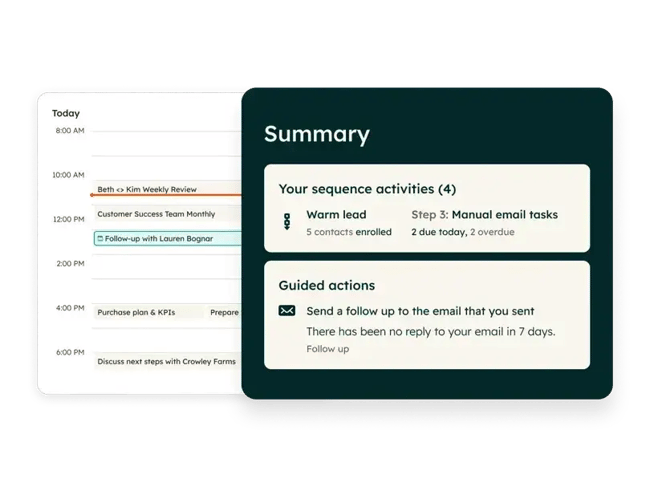
The prospecting workspace gives reps a daily, prioritized view of leads and target accounts, with AI-recommended next steps automatically surfaced so reps start each day knowing where to focus. Leads progress through pipeline stages based on engagement rules rather than manual updates, and the AI Meeting Assistant handles pre-call preparation, note capture, and follow-up drafting without rep involvement.
HubSpot reports that customers using Sales Hub see a 78% increase in deal close rates within six months. For teams already using HubSpot’s marketing or service tools, the prospecting workspace pulls in engagement history from every touchpoint — form fills, email opens, page visits — to give reps context for the conversation.
Standout Features
- Prospecting workspace: A single view of leads, target accounts, tasks, and AI-recommended daily actions — no switching between tools to manage the day.
- Automated pipeline progression: Leads move through customizable pipeline stages based on engagement triggers and required field rules, reducing manual data entry.
- AI Meeting Assistant: Handles pre-meeting research, captures key details during calls, and drafts follow-up automatically.
- Sequences: Automated, personalized follow-up sequences that pause or adjust based on prospect replies and engagement.
- Sales analytics and forecasting: Real-time pipeline visibility and forecasting tools built into the same platform reps use for prospecting.
- 1,700+ native integrations: Connects directly with existing sales tools from HubSpot’s app marketplace, without middleware.
Pricing
- Professional: $90/seat/month (billed annually) — AI Meeting Assistant, call transcription, sales analytics, forecasting, sequences, and 3,000 HubSpot Credits. One-time onboarding fee of $1,500 required.
- Enterprise: Custom pricing — advanced permissions, custom objects, predictive lead scoring, conversation intelligence, and expanded automation
- 14-day free trial available on paid plans
G2 rating: 4.4/5
Verdict: HubSpot Sales Hub is a good fit for teams that want lead management, pipeline tracking, and outreach coordination in one place, without adding separate tools. The AI features and engagement context are strongest when HubSpot is already in use across sales and marketing — but even as a standalone sales tool, the prospecting workspace reduces the daily administrative overhead that pulls reps away from conversations.
Apollo.io
Apollo.io is a sales intelligence and engagement platform that combines a database of over 275 million contacts with built-in sequence automation, a parallel dialer, and AI-powered campaign tools.
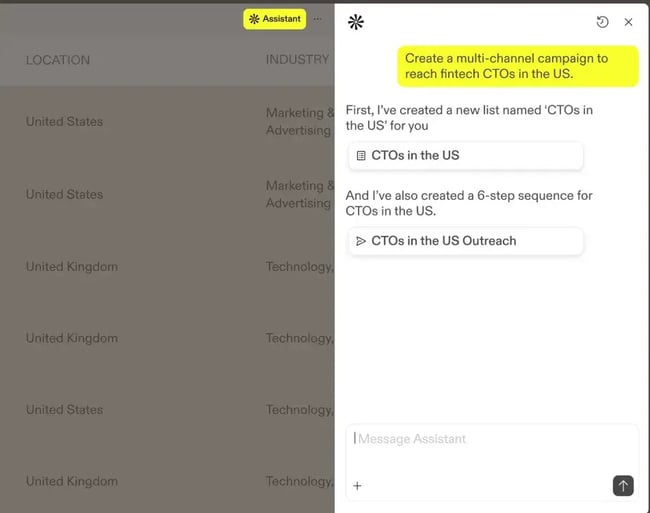
The platform is built around reducing the gap between data and outreach. Sales reps can identify target accounts using firmographic and intent-based filters, build contact lists using natural language AI prompts, and launch multichannel sequences without switching between tools. Apollo’s Chrome extension also lets reps execute tasks directly from LinkedIn or a prospect’s website, keeping workflow friction low.
G2 reviewers consistently highlight the volume and accessibility of contact data as Apollo’s strongest asset, with users citing accurate search results and time-saving automation as the features they rely on most. The friction points are equally consistent: data accuracy requires periodic verification against third-party sources, and the platform’s depth creates a learning curve that slows initial adoption for less technical users.
Standout Features
- AI campaign builder: Generate full multichannel sequences from a natural language prompt without manual sequence configuration
- Parallel dialer: Connect with multiple prospects simultaneously to increase live conversation rates
- Intent data and signals: Surface accounts showing active buying behavior to prioritize outreach timing
- Built-in deliverability tools: Domain health monitoring and sending controls to protect sender reputation
- Chrome extension: Execute prospecting tasks directly from LinkedIn, company websites, or Gmail
Pricing
- Free: 900 credits/user/year — AI Assistant, 2 sequences, basic filters, Chrome extension
- Basic: $49/user/month (billed annually) — 30,000 credits/user/year, unlimited sequences, deliverability suite, CRM integrations, waterfall enrichment, 6 intent topics
- Professional: $79/user/month (billed annually) — 48,000 credits/user/year, A/Z sequence testing, automated workflows, call recordings and AI insights (4,000 mins), unlimited mailboxes, analytics
- Organization: $119/user/month, min. 3 users (billed annually) — 72,000 credits/user/year, customizable dashboards, SSO, advanced security, 8,000 call recording mins, 12 intent topics
- Inbound add-on: $119/team/month — website visitor identification, form enrichment
- Advanced Dialer add-on: $119/team/month — parallel dialer, international calling, local presence, power dialer
G2 rating: 4.7/5
Verdict: Apollo.io fits sales teams that want a single platform covering data enrichment, sequence automation, and outbound dialing without stitching together multiple point solutions. The contact database and AI campaign tools make it great for teams scaling outbound from scratch. Teams with existing enrichment infrastructure or complex CRM sync requirements may find the integrations less flexible than dedicated tools built specifically for those functions.
Best for: Sales teams building outbound from scratch who want contact data, sequence automation, and dialing in one platform.
|
Pros |
Cons |
|
Large, regularly updated contact database |
Parallel dialer quality inconsistent across regions |
|
AI sequence builder reduces setup time |
Feature depth creates a learning curve for new users |
|
All-in-one platform reduces tool sprawl |
CRM integration options less flexible than dedicated sync tools |
Outreach
Outreach is a sales execution platform built for enterprise and mid-market revenue teams that need to coordinate prospecting, account management, and deal activity without switching between tools.
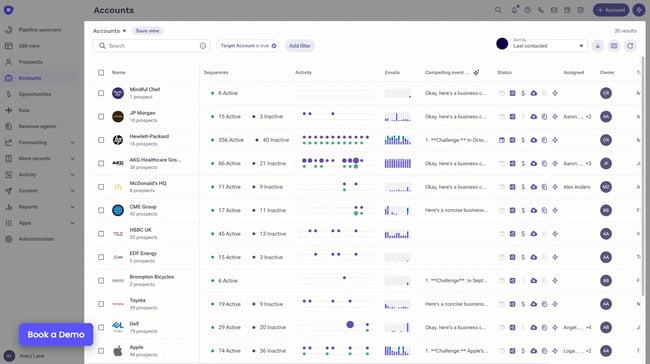
The platform reduces the prep work that happens before outreach begins. Research Agent and Revenue Agent handle account research, sequence enrollment, and next-step recommendations automatically so reps spend more time in conversations and less time building lists and writing follow-ups.
G2 reviewers consistently highlight how much the automation speeds up day-to-day follow-up and lead engagement. The recurring complaints center on onboarding — the platform takes time to learn, and dialer functionality draws consistent criticism from teams that rely heavily on phone outreach.
Standout Features
- Research Agent: Automatically surfaces account initiatives, decision-makers, and buying signals before reps engage.
- Revenue Agent: Handles prospect research, sequence enrollment, and next-step guidance across inbound and outbound workflows.
- Smart Account Plans: Centralizes stakeholder maps, account insights, and team activity so large account teams stay coordinated.
- Kaia AI assistant: Provides real-time talk guidance and automatic action-item detection during live calls.
- Sequence Engagement Scoring: Ranks sequence performance in real time so teams can identify what’s generating pipeline and scale it.
Pricing
- Custom pricing only — Outreach does not publish standard plan rates. Pricing is based on team size, use case, and feature scope.
G2 rating: 4.3/5
Verdict: Outreach fits enterprise and mid-market teams that need a coordinated layer across the full sales cycle. The AI automation and account planning tools make it a strong fit for larger, multi-stakeholder deals. The lack of published pricing and the time investment required to get up to speed make it a harder case for smaller teams that need something running quickly.
Best for: Enterprise and mid-market revenue teams running complex, multi-stakeholder sales cycles.
|
Pros |
Cons |
|
Deep automation across inbound and outbound workflows |
No transparent pricing — requires a sales conversation to evaluate cost |
|
AI agents cut manual research and prep time significantly |
Steep learning curve slows onboarding for new teams |
|
Strong account planning tools for complex selling environments |
Dialing functionality has reported limitations |
ZoomInfo
ZoomInfo is a B2B contact database and prospecting platform built around the depth and accuracy of its data — 420 million global contacts, 70 million phone numbers, and 174 million verified email addresses. It gives sales teams a large, filterable pool of prospects to work from.
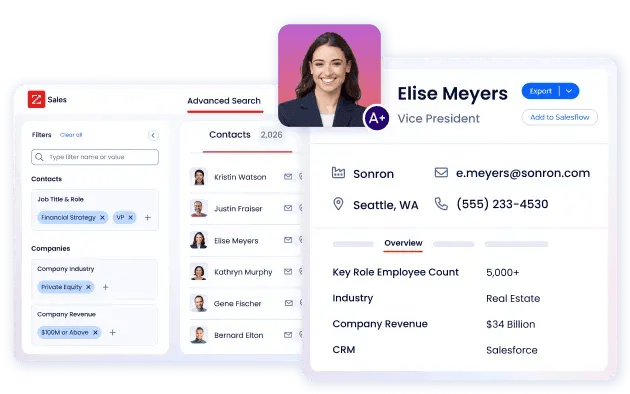
Beyond the database itself, ZoomInfo tracks buying signals like companies researching solutions in a given category, accounts visiting a website, technology changes at target companies. It then surfaces those signals to help reps prioritize who to contact and when.
The most common complaint from G2 reviewers is data freshness. Outdated job titles, stale email addresses, and contacts that haven’t kept pace with job changes come up frequently enough that teams running high-volume outreach typically build a verification step into their workflow.
Standout Features
- Contact and company database: 420M+ global contacts filterable by industry, company size, technology stack, funding stage, and 300+ other attributes.
- Buyer intent tracking: Identifies companies actively researching solutions in a given category before they reach out to a sales team.
- Website visitor identification: Surfaces named accounts browsing a website and routes them into outreach workflows automatically.
- ZoomInfo Copilot: Generates AI-drafted emails and call summaries, and prioritizes accounts based on real-time buying activity.
- Engage: Built-in multi-touch sequencing with email and a direct dialer, so outreach runs from the same platform as the data.
Pricing
- Custom pricing only — ZoomInfo does not publish standard plan rates. Pricing varies by database tier, seat count, and add-ons selected.
- A free trial is available directly on the ZoomInfo website without requiring a sales call first.
Verdict: ZoomInfo fits teams where finding and prioritizing the right contacts is the primary bottleneck, especially for those working in large target markets. The buying signal features add a useful layer on top of raw contact data. Teams should plan for a data verification step from the start, since treating the database as a finished source rather than a strong starting point tends to create problems at the outreach stage.
Best for: Teams where contact discovery and intent data are the primary prospecting bottleneck.
|
Pros |
Cons |
|
One of the largest verified B2B contact databases available |
Data freshness is a recurring issue — stale contacts require ongoing verification |
|
Highly granular search filters for precise list building |
Custom pricing makes cost hard to assess without a sales conversation |
|
Buying signal data adds context to prioritization decisions |
Full functionality requires multiple add-ons that raise the total cost |
How to Personalize Automated Sales Prospecting at Scale
The biggest mistake in automated prospecting is treating personalization as a cosmetic layer and swapping in a first name and a company name, and calling it relevant. Buyers in 2026 see enough templated outreach to recognize it immediately.
Personalization at scale works when it’s built around signals.
I’ve found that the sequences generating the strongest reply rates are the ones tied to a specific trigger like a funding announcement, a new executive hire, a technology the prospect recently adopted, or a piece of content their company published.
For example, a prospect who just raised a Series B understands immediately why a relevant vendor is reaching out since the timing explains itself.
These inputs matter most when building personalized sequences at volume:
- Trigger-based enrollment. Add prospects to sequences when a signal fires, like a job change, a funding round, an intent spike.
- Industry and persona-specific messaging. Build separate sequences for different buyer roles and verticals rather than sending one sequence to every contact.
- CRM data as a personalization layer. Reference past interactions, open deals, or marketing engagement already logged in the CRM to make outreach feel continuous rather than cold.
- Variable fields with meaningful inputs. Use fields that require real research — recent company news, a specific pain point, a named competitor.
- Sequence length calibration. Match follow-up cadence to the buyer’s typical research cycle rather than defaulting to a fixed seven-step sequence for every persona.
Automation handles the delivery while the personalization itself still requires thought — which signals matter for a given audience, what context makes an opening line worth reading, and where a human response is needed to keep the conversation moving.
Sales Prospecting Automation Workflows
Automation tools only produce results when the workflows behind them are clearly defined. The four workflows below cover the prospecting scenarios where automation has the most practical application.
Trigger-based Outreach on Buying Signals
This workflow monitors a defined list of target accounts for events that indicate a higher likelihood of purchase, like a new funding round, a leadership hire in a relevant role, a technology installation, or a spike in intent data, and automatically enrolls the account in a sequence when a signal fires.
Outreach tied to a specific event at an account arrives with built-in context. A CFO who just joined a company is still mapping the technology landscape, evaluating inherited tools, and building their own vendor relationships, and six months in, those decisions are largely made.
Setup sequence:
- Define signal triggers, like funding events, job changes, technology installs, intent score thresholds.
- Connect signal source to sequencing tool via ZoomInfo, Apollo.io, or HubSpot Breeze Prospecting Agent.
- Build signal-specific messaging. Set one sequence per trigger type, each with a relevant opening line that references the event directly.
- Set enrollment rules. Prevent accounts already in active pipeline from entering a cold sequence simultaneously.
ABM Sequences with Account-level Personalization
Account-based prospecting sequences coordinate outreach across multiple contacts at the same company simultaneously. It targets different stakeholders with messaging tailored to their role while keeping the account-level narrative consistent across touchpoints.
Where standard sequences treat each contact independently, ABM workflows treat the account as the unit. A VP of Sales and a Head of Revenue Operations at the same company are evaluating the same problem from different angles, and the sequence each receives should reflect that without contradicting the other.
This workflow typically runs as follows:
- Build an account list filtered by ICP criteria — industry, company size, technology stack, revenue range.
- Map stakeholders per account by identifying two to four contacts per company across relevant buying roles.
- Create role-specific sequence variants with the same core narrative, different emphasis per persona.
- Set suppression rules, like if one contact replies or books a meeting, pause outreach to other contacts at the same account automatically.
- Log all account-level activity to CRM, so any rep picking up the account has full visibility into every touchpoint across every contact.
Coordinating outreach across the account removes the risk of a champion going quiet and taking the deal with them.
I’ve seen this workflow make a significant difference, specifically for enterprise deals where a single contact rarely has full buying authority, and a sequence that only engages one stakeholder is one conversation away from going dark.
Inbound-to-outbound Handoffs that Don’t Drop the Ball
An inbound lead that doesn’t receive a fast, relevant follow-up is a warm opportunity that cools quickly. This workflow automates the handoff between a prospect’s inbound action — a form fill, a content download, a pricing page visit — and a personalized outbound sequence. It ensures response time stays short and context from the inbound action carries through to the outreach.
The manual version of this handoff breaks in predictable ways. A lead comes in overnight, sits in a queue until morning, gets assigned to a rep who sends a generic follow-up two days later with no reference to what the prospect actually did. By that point, the prospect has moved on.
Here’s an example of an automated handoff.
- Trigger: Prospect completes a form, visits a high-intent page, or hits a lead score threshold in the CRM
- Immediate action: Contact record enriched automatically with firmographic and contact data
- Sequence enrollment: Prospect enters a sequence specific to the inbound action — a demo request gets different messaging than a content download
- Rep notification: Assigned rep receives an alert with full context — what the prospect did, what company they’re from, what sequence they’ve entered
- Response monitoring: If the prospect replies, the sequence pauses automatically and routes to the rep for a human response
The speed and relevance of the first follow-up has an outsized impact on whether an inbound lead converts to a meeting. Automation removes the variables like rep availability, time zone, queue depth, that determine how fast that follow-up arrives.
Re-engagement for Stalled Opportunities and Lost Deals
Not every deal that goes quiet is a dead deal. Prospects go dark for reasons that have nothing to do with fit, like budget cycles reset, priorities shift, internal projects get delayed. A re-engagement workflow systematically revisits these contacts at defined intervals with messaging that acknowledges the gap and gives them a low-friction reason to respond.
This is one of the highest-ROI automation workflows available to most sales teams because the list already exists. Every CRM has a backlog of closed-lost deals, stalled opportunities, and contacts who went silent after a promising first conversation. Without automation, that list sits untouched because working it manually competes with the active pipeline for rep attention.
Here’s an example of a re-engagement workflow structure.
- Segment the list: Closed-lost deals by reason, stalled opportunities by last activity date, and churned accounts by tenure
- Set re-entry timing: 90 days for stalled deals, 6 months for closed-lost, 12 months for churned accounts as a starting baseline
- Build segment-specific messaging: Reference the previous conversation, acknowledge the time gap, lead with something new — a product update, a relevant case study, a market shift
- Keep sequences short: Two to three touches maximum before marking the contact inactive again
- Route replies immediately: A response from a previously cold contact is a high-priority signal and should reach a rep the same day
The contacts in this list have already been through qualification once so re-engagement automation recovers pipeline that would otherwise require starting from scratch.
Where to Start with Sales Prospecting Automation
Automated sales prospecting gives teams a way to grow pipeline without growing headcount. The tools covered here each solve a different piece of that problem, from contact data and sequencing to full-cycle execution.
For teams already running HubSpot, Breeze Prospecting Agent handles signal monitoring, account research, and personalized outreach from inside the CRM where the data already lives.
I’d start there before adding point solutions since the context HubSpot already holds about a prospect is worth more than most standalone enrichment tools can replicate from scratch.
Frequently Asked Questions About Sales Prospecting Automation
What is an automated prospecting system?
An automated prospecting system is a set of connected tools and workflows — including AI sales agents, sequencing software, and CRM integrations — that handle the research, outreach, follow-up, and data logging tasks involved in finding and engaging potential buyers without requiring manual rep input at each step. Most systems combine a contact database, a sequencing tool, and a CRM integration to move prospects from initial identification through to a booked meeting.
How do I personalize automated sales prospecting without sounding robotic?
Personalization at scale works when sequences are built around specific triggers — a funding round, a leadership change, a technology the prospect recently adopted — rather than generic role-based templates. Keeping variable fields specific and meaningful rather than superficial, like referencing a company’s recent expansion rather than just their industry, is what separates outreach that reads as relevant from outreach that reads as automated.
When should you use AI agents versus reps in prospecting?
AI agents handle the tasks that benefit from consistency and volume — account monitoring, signal detection, initial research, and first-touch email drafting. Many of the most time-consuming prospecting tasks fall into this category. Governance controls protect deliverability and compliance during that automated activity, keeping sending volume, opt-out handling, and data permissions within safe boundaries. The most productive prospecting setups use AI agents to surface the right opportunities at the right time, and reps to take those opportunities through to a meeting.
How do I protect email deliverability with automation?
Start with domain and mailbox warm-up before running any sequences at volume. Most prospecting platforms, like HubSpot, include warm-up tools for this purpose. Keep daily sending volumes within safe thresholds, maintain a healthy reply-to-unsubscribe ratio, and verify contact emails before sending. Deliverability problems compound quickly at scale, so building verification and warm-up into the setup process from the start is significantly easier than recovering a damaged sender reputation later.
How long until automation shows results?
Sales teams running structured automation programs typically see measurable movement in reply rates and meetings booked within 30 to 60 days of running consistent, well-structured sequences. The first two weeks typically surface data on what isn’t working — subject lines, send timing, sequence length — and that feedback loop is what drives improvement.
Teams that treat the first month as a testing phase rather than a performance period tend to see stronger results by the end of the second month.
Scale with sales prospecting automation.
Sales prospecting automation works when the workflows behind it are clearly defined and the tools are matched to the actual bottleneck. Whether that’s contact data quality, outreach personalization, inbound handoff speed, or re-engagement of stalled pipeline, each problem has a workflow that addresses it without requiring manual rep intervention at every step.
For teams already running HubSpot, Breeze Prospecting Agent is the natural starting point. Signal monitoring, automated account research, and AI-drafted outreach all run inside the CRM where the full customer history already lives. That context is what separates personalization that converts from personalization that looks automated. Add point solutions only after the core workflow is running and the data is telling you where the next bottleneck is.

 Chinese
  English (United States)