Sales workflow automation is no longer a “nice to have” for small businesses. It’s quickly becoming a requirement to stay competitive. Sales teams spend a significant portion of their time on administrative work rather than selling. Manual sales processes become a bottleneck, and small teams feel this pressure the most.
Studies show that automation tools increase a company’s sales productivity by 14.5%. They help businesses streamline repetitive tasks, respond to leads faster, and create more consistent sales processes without adding complexity or cost.
This guide breaks down what sales workflow automation really means, the tangible benefits for small teams, how to get started step by step, and the best workflow software for small businesses.
Table of Contents
What is sales workflow automation, and why should small businesses use it?
Sales workflow automation is the process of automatically managing, executing, and tracking repetitive steps in the sales process, such as lead assignment, follow-ups, data updates, meeting scheduling, and pipeline stage changes.
Instead of relying on manual actions, predefined rules and triggers make sure that tasks move forward consistently based on prospect behavior or sales activity. The goal is to create a repeatable, structured sales process that runs in the background while teams focus on closing deals.
For small businesses, sales workflow automation is especially valuable because it addresses common constraints around time, headcount, and consistency. Workflows reduce this overhead by handling routine actions automatically, helping small teams respond faster to leads, follow up more consistently, and avoid deals slipping through the cracks.
Sales workflow automation for small businesses improves accuracy and visibility. Provided the workflows are set up and configured correctly, automation updates records automatically, leading to cleaner data and more accurate, more dependable reporting across the sales system.
The Benefits of Sales Automation for Small Businesses
Sales automation tools reduce repetitive everyday tasks. Small businesses in particular have lean sales teams and limited resources, so automation can have an outsized impact.
Below are the core benefits of sales automation.
More Time for Sales Reps
Sales automation significantly reduces the amount of manual work involved in running a sales process. Tasks such as lead assignment, data entry, follow-up emails, meeting scheduling, and status updates can all be handled automatically.
Studies show that sales reps spend around 70% of their time on non-selling activities such as data entry and administrative tasks. Automations allow sales teams to spend less time managing systems and more time engaging with prospects.
Competitive Differentiation
For small businesses, speed and consistency can be a competitive advantage. Sales automation ensures faster response times, structured follow-ups, and a more predictable buyer experience.
When prospects receive timely, relevant communication and clear next steps, small businesses can compete more effectively with larger organizations that have bigger sales teams. Automation helps level the playing field by enabling small teams to operate with the efficiency and discipline of much larger sales operations.
Personalized Outreach at Scale
Modern sales automation enables personalization that goes far beyond basic merge fields, like using {First_Name}. Automation tools can tailor outreach based on prospect behavior, engagement history, industry, company size, or stage in the buyer journey.
Studies show that campaigns that use deeper personalization consistently outperform generic outreach, achieving open rates nearly 29% higher and click-through rates up to 41% greater than non-personalized campaigns.
Automation tools make it feasible to use deep personalization at scale.
For example, messaging can adapt based on which pages a prospect visited, which emails they opened, or whether they booked a meeting. This deeper level of personalization increases relevance and response rates, while still allowing small teams to run campaigns at scale.
Fewer Errors
Sales automation significantly reduces manual data entry, which in turn lowers the risk of human error. When processes run automatically, data is captured and updated consistently, without the fatigue or inconsistency that comes with day-to-day tasks.
From my experience working alongside sales teams, I noticed errors were even more common when tasks were repetitive or unengaging. Our outreach began with researching prospects on LinkedIn to check whether they matched the ideal customer profile. This usually had to be done under time pressure, so mistakes crept in.
When my attention dropped, accuracy suffered. Automation helps eliminate these weak points by handling routine work reliably, allowing teams to focus their attention where it actually matters.
How to Start Sales Workflow Automation if You’re a Small Team
Sales workflow automation works best when it’s introduced gradually and built around real processes. Below is a practical, step-by-step approach small teams can follow to get started without adding complexity.
Sales leaders should map their current sales process, identify repetitive and time-consuming tasks, choose one workflow to automate first, define triggers, conditions, and actions, test before roll-out, and monitor performance.
Step 1: Map the current sales process.
Begin by documenting how leads currently move through the sales funnel (all the steps from first contact to closing). Include lead sources, handoffs, follow-ups, meetings, and deal updates. The goal is to identify repeatable steps that happen consistently, regardless of who is selling.
An example of a typical sales process is as follows:Lead capture → qualification → follow-up → meeting → deal progression
Step 2: Identify repetitive and time-consuming tasks.
Next, isolate tasks that are manual, frequent, and rule-based. These are the strongest candidates for automation because they don’t require judgment.
Common examples:
- Assigning new leads
- Sending follow-up emails
- Updating deal stages
- Creating tasks or reminders
Step 3: Choose one workflow to automate first.
Small teams should avoid automating everything at once. Start with a single, high-impact workflow.
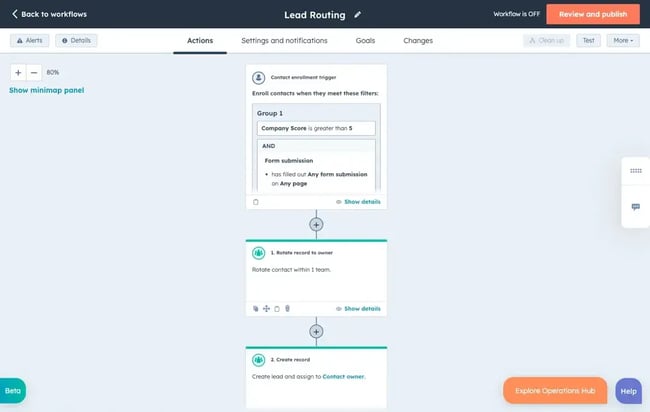
For example, lead assignment is the simplest thing to automate first. HubSpot Sales Hub allows assigning leads to contact owners through the following automation:
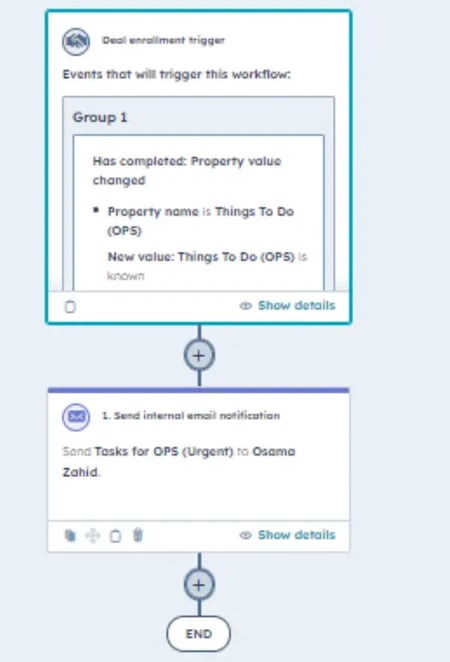
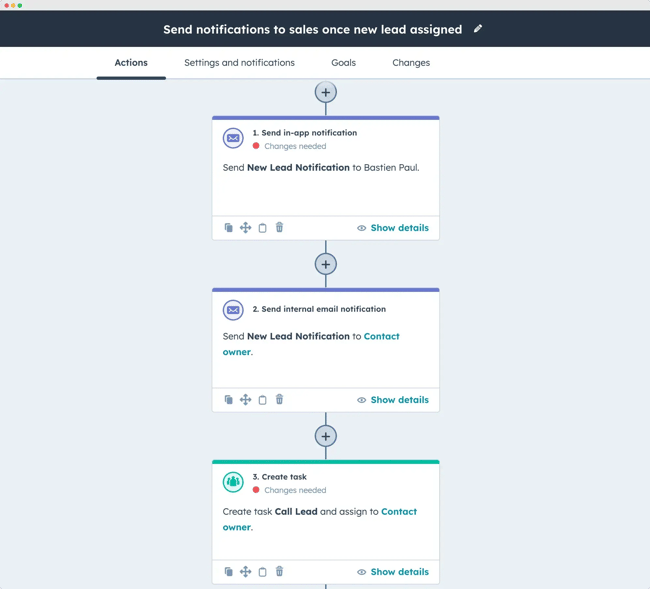
HubSpot also allows creating automation triggers when a task is completed and when a property value changes.
Source
The workflow sends notifications to relevant team members. The alert can be sent to a team leader to maintain visibility or to a sales rep to enable timely and effective follow-up actions.
Step 4: Define triggers, conditions, and actions
Each workflow needs clear logic:
- Trigger. What starts the workflow (e.g., form submission, deal created).
- Conditions. Rules that filter who qualifies (e.g., lead source, company size).
- Actions. What happens next (e.g., send email, assign owner, update field).
Clear definitions prevent automation from firing at the wrong time or for the wrong contacts.
Step 5: Test before rolling out.
Before activating workflows for the full pipeline, test them internally using sample leads or test records. This helps catch errors such as duplicate emails, incorrect assignments, or missing steps.
For instance, have a look at the following workflow created inside HubSpot:
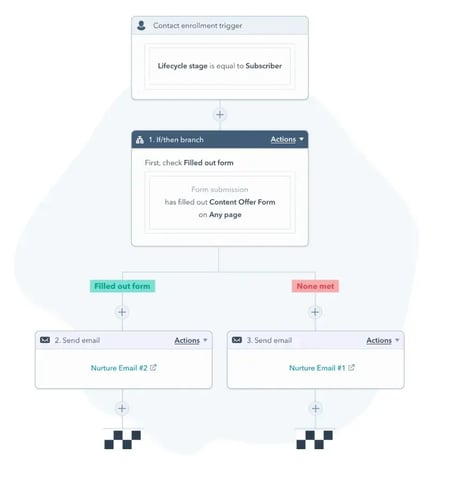
The key checks in the test would be:
- Does the workflow trigger when the lifecycle stage is set to “Subscriber” or in other stages too?
- Are actions firing in the right order, i.e., when the “Content Offer” form is submitted?
- Is the right nurture email being sent to the correct contacts?
Step 6: Monitor performance and refine.
Once live, workflows should be reviewed regularly. Metrics such as response time, follow-up completion, and conversion rates help determine whether automation is improving outcomes or needs adjustment.
After one workflow proves effective, start creating more automations according to the use case and requirements (such as lead nurturing, meeting follow-ups, deal stage updates, etc.). A new workflow can build on what’s already working.
Sales Workflow Software Built for Small Businesses
Let’s have a look at the best sales workflow automation software and CRM software for small businesses and startups.
1. HubSpot Sales Hub
Using HubSpot Sales Hub, sales teams can automate routine tasks where human input adds little value — tasks that must be executed accurately and consistently every day.
HubSpot combines workflow automation, real-time insights, and CRM data in a single tool, making it especially useful for teams with limited resources.
Here are some simple and effective ways to automate your business using HubSpot:
Update lead statuses and deal stages.
Lead capture and assignment can be automated using forms and routing rules. Tasks such as updating deal stages can be automated using intuitive workflows:
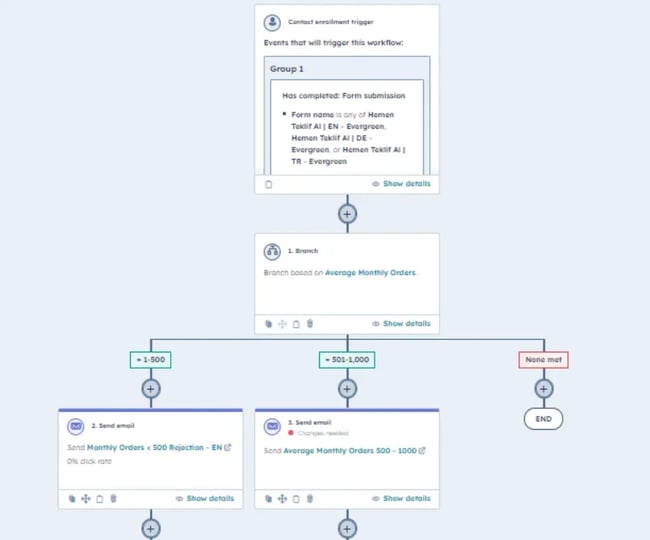
HubSpot workflows trigger based on defined conditions like activity, timing, or deal progression.
Create smart lead routing workflows.
Smart lead routing helps small businesses respond faster and sell more efficiently by automatically assigning incoming leads to the right sales rep. HubSpot workflows improve response times, increase fairness across the team, and ensure every lead is followed up by the most suitable person.
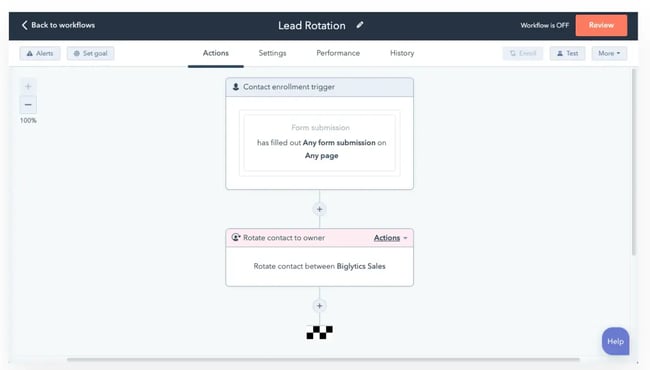
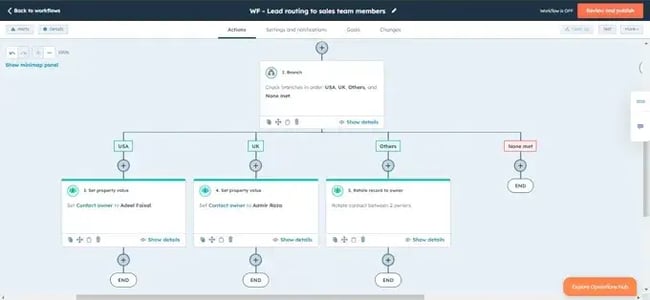
Source
Instead of manually distributing leads, the system routes each prospect based on predefined criteria such as:
- Geographic location, ensuring territory alignment.
- Current workload, to balance assignments and prevent bottlenecks.
- Industry expertise, so leads are handled by reps with relevant knowledge.
- Lead score or priority, allowing high-intent prospects to receive immediate attention.
Design inbound qualification workflows.
HubSpot enables small teams to enforce consistent qualification logic. Workflows automatically evaluate new leads using criteria such as target market and average monthly order values:
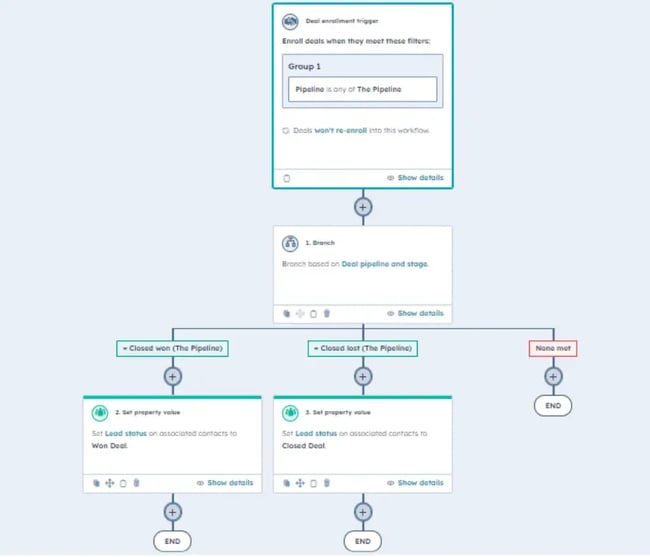
Leads that don’t meet the qualification criteria are automatically sent rejection emails. HubSpot makes it fairly simple to create workflows for sending follow-up emails and scheduling meetings.
Lead ownership and distribution workflows.
Google Ads leads, chatbot conversions, and inbound forms are automatically assigned to owners, lifecycle stages are set, and SDR rotations distribute opportunities fairly over time. This removes ambiguity around responsibility and ensures no lead is left unworked due to oversight.
Automation to support cross-team operations.
HubSpot workflows support cross-team operations beyond pure sales. It centralizes workflows across sales, marketing, and operations in a single system.
In small businesses, operations and technical teams often work in close coordination. Automation can be used to send an internal notification whenever action is required from either team, ensuring faster handoffs, clearer accountability, and smoother cross-team collaboration.
Add prospects to relevant lists.
Workflows can be added to create relevant lists, which reduce data entry for SDRs. Sales teams can create a workflow to prioritize the most promising opportunities. High-quality leads can be identified and added to a separate list early in the process.
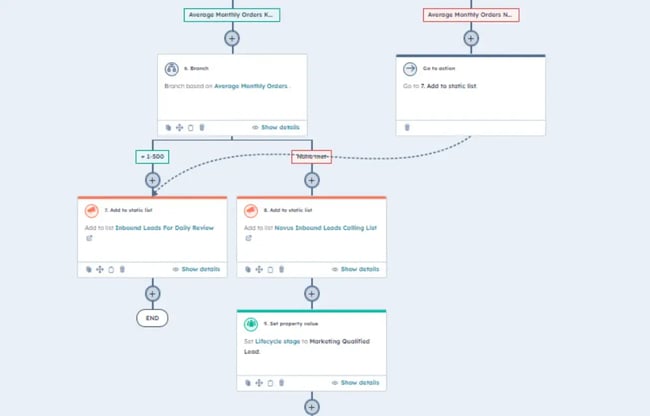
Additional workflows can be designed to create company lists by ICP tiers. This way, teams can focus their efforts on accounts that best match their ideal customer profile.
Reporting and Analytics
HubSpot workflows play a key role in maintaining pipeline accuracy and reporting integrity. As deals move through stages, lead statuses and lifecycle stages are updated automatically, forecast categories are assigned consistently, and sales probability values stay aligned for accurate reporting.
For small teams, these automations are especially valuable because they deliver reliable, up-to-date data without adding administrative overhead.
In small businesses where sales and marketing responsibilities often overlap, HubSpot Marketing Hub is frequently used by sales teams to build and manage drip campaigns alongside their core sales activities. The platform’s strong integration with other parts of the HubSpot ecosystem (Marketing Hub, Service Hub, and Data Hub) means that automated workflows can span marketing, sales, and customer success.
2. KEAP
Keap is a CRM automation platform designed to replace manual, repetitive processes with structured workflows. It helps small businesses automate everyday sales and marketing activities so teams can stay consistent without constant hands-on effort.
Core Features:
- Sales automation. Sales automation makes lead generation more efficient by capturing prospects through web forms and landing pages that automatically collect and organize contact information. Lead nurturing is then handled through automated email sequences and timely follow-ups triggered by prospect behavior or sales stage.
- Sales pipeline. Sales pipeline automation assigns tasks and reminders to the right team members. It provides a clear, high-level view of the entire sales process. It also enables teams to track the status of every deal and prospect across pipeline stages from a customizable dashboard.
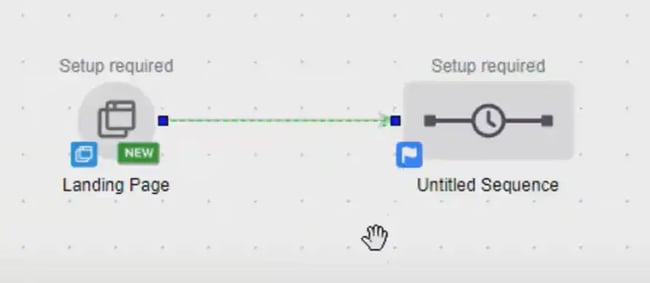
What I like: Automations are easy to build using drag-and-drop functionalities. Also, the pre-built customizable email templates allow marketers to save time when creating email designs.
Pricing: Starts at $299/month for a minimum of two users and 1,500 contacts. The pricing goes up as the number of users and contacts increases.
3. Pipedrive
Pipedrive is another small business sales tool that enables teams to create custom pipelines, automate email sequences, and configure third-party integrations with ease. It combines the advanced capabilities of an enterprise-grade CRM with the usability and simplicity of a lightweight application.
Core Features:
- Trigger emails based on activity. Automatically send predefined email messages when specific deal actions occur. Pipedrive allows timely and relevant prospect engagement.
- Automate deal progression. Set up rules that move deals through pipeline stages automatically, minimizing manual updates.
- Monitoring pipeline activity. Visualize deal progress through intuitive Kanban boards or list views to understand status and momentum instantly.
- Built-in calendar. Plan daily tasks, focus on high-priority opportunities, and keep sales efforts aligned with closing goals.
What I like:
- Workflows can be triggered when a web form is submitted to automatically send nurturing emails.
- Automations can also update deal fields and notify a sales team leader when new leads are added.
- When a new prospect or contact is created in the system, automated workflows can be used to send welcome emails.
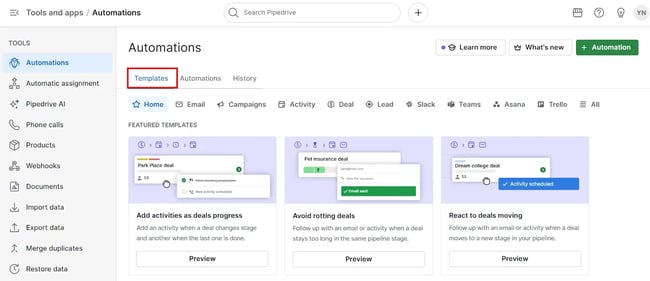
- Pre-built automation templates are organized by categories such as email, campaigns, and activities. This makes it easy to quickly find and apply the workflows most relevant to the task at hand.
Pricing: Starts at $19 per user/month when billed monthly.
4. Smartlead.ai
Smartlead.ai is useful for startups and small businesses that rely on outbound sales but lack the resources for complex sales operations. It is a superb tool for sending cold emails.
Core Features:
- Email follow-up automation. Uses AI to automate multi-step follow-up sequences that adjust based on engagement behavior, freeing teams from manual sequencing and ensuring consistent contact without constant oversight. The platform also optimizes send times and personalization to improve engagement and response rates.
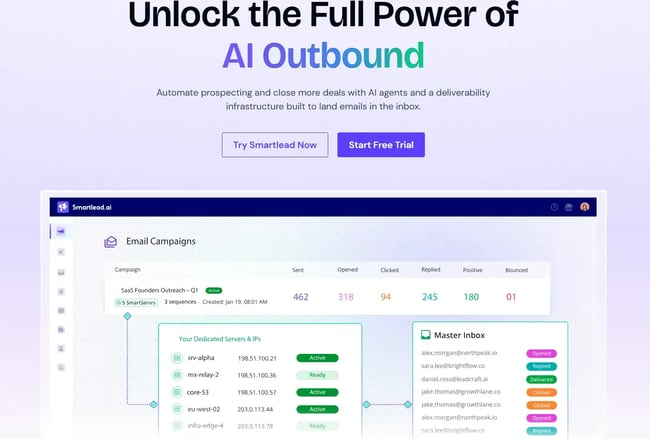
- Powerful API and automation. Supports API access and webhook integrations, enabling workflow automation with CRM systems, task managers, and other sales tools.
What I like:
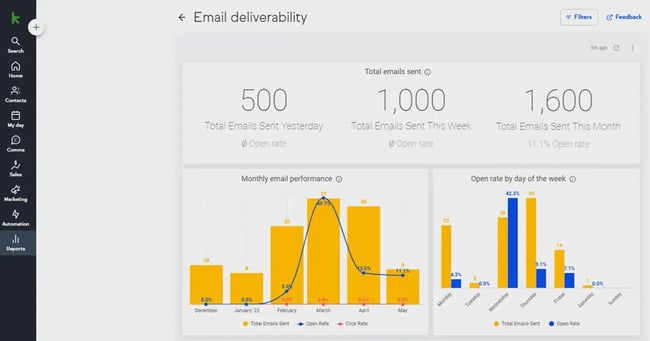
- A key part of running effective automations is ensuring that automated emails actually reach recipients’ inboxes rather than spam folders. SmartDelivery uses data to build sender reputation and reduce the risk of emails landing in spam folders.
- Deliverability testing identifies issues and allows them to be rectified before campaigns are scaled.
Pricing: Its base pricing starts at $39/month.
How can a small business use AI-assisted sales workflow automation?
Increase headcount (without actually increasing it).
A small business can use AI-assisted sales workflow automation to operate with the efficiency of a much larger team, without adding complexity or headcount. AI tools generate personalized outreach at scale, adapt follow-up timing based on prospect behavior, and summarize calls or emails to keep records accurate without manual input.
Speed directly impacts competitiveness.
Rather than replacing human effort, AI reduces administrative overhead and decision fatigue, allowing small teams to focus on relationship-driven work such as discovery, problem-solving, and closing. For small businesses, this means faster response times, better use of limited resources, and a more predictable sales workflow without the need for enterprise-level infrastructure.
Consistent efforts are vital.
AI-assisted automation helps maintain consistency across the sales process by updating CRM fields, triggering next steps, and flagging deals that need attention.
Small businesses should prioritize the most promising prospects. AI tools can automatically qualify incoming leads by analyzing engagement signals, past interactions, and firmographic data.
Frequently Asked Questions About Sales Workflow Automation for Small Businesses
What should I automate first in a small sales team?
Start automating the unglamorous but time-consuming tasks that quietly slow teams down. Small sales teams often spend hours checking email deliverability, monitoring open and reply rates, and manually looking up prospect details on platforms like LinkedIn. These repetitive activities don’t require human judgment, yet they consume valuable selling time.
Automating the core tasks in the lead generation process, such as email tracking, follow-ups, data enrichment, and prospect research, frees the team to focus on conversations that actually move deals forward.
How long does it take to set up a basic sales workflow?
The setup time largely depends on the team’s level of experience with sales tools and automation platforms. For someone familiar with CRM systems and workflow builders, a basic sales workflow, such as lead assignment or sending follow-up emails, can be configured in a matter of minutes.
For teams that are newer to automation, the process may take longer, as it involves defining sales stages, mapping triggers and actions, and testing the workflow to ensure it runs correctly. However, even with limited expertise, most small businesses can set up a functional sales workflow within a few hours, and the time invested quickly pays off through increased efficiency and reduced manual work.
Will sales automation replace my reps?
Sales automation does not replace sales reps. It makes them more valuable. Automation handles repetitive, administrative tasks such as data entry, follow-ups, and activity tracking. This allows reps to spend more time on work that requires judgment and empathy.
Sales reps remain essential for building relationships, understanding customer needs, handling objections, and guiding prospects through complex decisions. By taking routine work off their plates, automation enables reps to focus on meaningful conversations and stronger connections.
How do I avoid over‑automating and annoying prospects?
The rule of thumb here is that automation should not overwhelm inboxes with generic or excessive outreach. To avoid crossing that line, limit the number of automated messages. Space out outreach and tailor content based on behavior or intent. Make sure communication feels thoughtful and human rather than robotic.
Do I need separate tools for marketing automation and sales automation?
Marketing and sales workflows overlap significantly, especially in small and growing businesses. Both teams rely on shared data such as leads, contact activity, email engagement, and deal status, which makes using completely separate tools unnecessary.
A well-designed automation platform can support the core processes across both functions, including lead capture, nurturing emails, lead scoring, handoffs to sales, follow-ups, and activity tracking. It’s best to use a single tool as it reduces complexity, improves alignment between teams, and creates a more consistent experience for prospects.
The HubSpot ecosystem offers a unified platform for sales, marketing, service, and data — all connected to the CRM. Both Sales Hub and Marketing Hub have automation baked into them.
How much does sales workflow automation cost?
Sales workflow automation costs vary based on the software used. Small businesses can get started with free plans or entry-level tiers that offer basic automation such as task creation, email triggers, and lead capture. HubSpot CRM allows access to basic workflows at $50/month. Advanced automation tools with multi-step workflows, conditional logic, and sequences start from $90 per user/month.
For sales teams that need automation, along with enterprise-level features such as AI call transcript enrichment, the costs rise to $150+ per user per month. That said, most small businesses don’t need enterprise-level functionality at the outset. Many start with low-cost or free tools and scale their investment gradually as sales volume and automation needs grow.
Leveraging Workflow Automation for Small Business
Small, resource-constrained teams need speed, structure, and scalability. Using workflow automations demonstrates strategic thinking that aligns perfectly with small business needs.
An efficient sales automation software is one that helps small teams maintain momentum, reduce missed follow-ups, and manage their sales pipeline more efficiently with minimal manual intervention.
In my opinion, HubSpot is the best in automations as it enables small businesses to:
- Maintain clean, trustworthy data with minimal manual effort.
- Extend automation into marketing and operations, which directly impact sales.
- Gain clear visibility into performance through forecasting and reporting.
- Combine efficiency with human oversight, as workflows don’t have to be entirely hands-off. HubSpot supports manual email steps that allow teams to add context or customize details before the automation continues.
Remember, the goal is to implement practical, high-impact workflow automation that scales output efficiently and supports long-term profitability. So, take the time to evaluate available options and identify the tools that will deliver the most value.

 English (United States)
  Chinese